Rooster Rivals: Find Hatched Chicks in Your Incubator
Recognize chicks waiting in your incubator, find the TAKE OUT and ALL OUT controls, and distinguish hatched chicks from stored eggs.
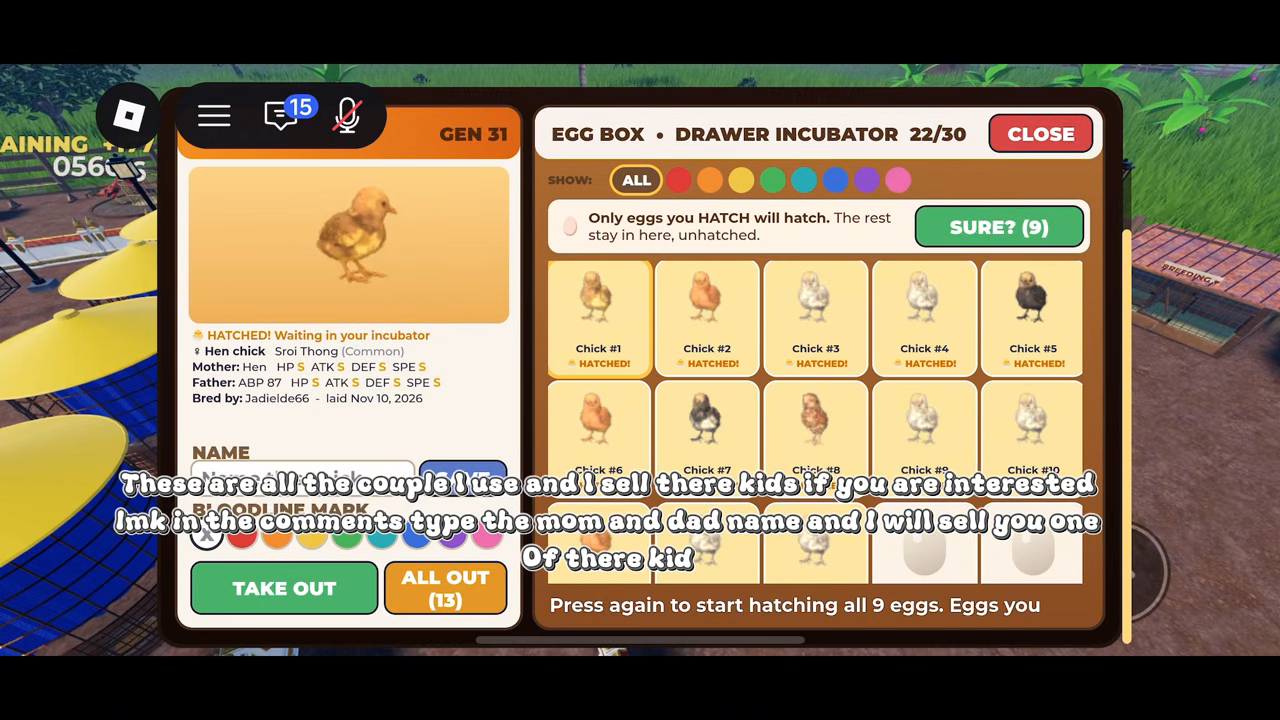
When chicks have already hatched in Rooster Rivals, open your incubator and select a hatched chick. Its panel reads “HATCHED! Waiting in your incubator”, with TAKE OUT and ALL OUT collection controls visible.
Find the waiting chicks and collection controls
- Look for the hatch notification. It announces that chicks have hatched and tells you to open your incubator to take them out.
- Open your incubator. Find the hatched chick cards and select a chick.
- Check the selected chick’s panel. The “HATCHED! Waiting in your incubator” message identifies a chick that has finished hatching and is still waiting there. The TAKE OUT and ALL OUT controls appear with that selected-chick information.
The notification points you toward the incubator; the selected chick’s status gives you the more specific confirmation. If you are trying to locate the collection controls, use that status text as your visual reference inside the panel.
Stored eggs and hatched chicks are different states
The incubator gives an explicit instruction: “Only eggs you HATCH will hatch. The rest stay in here, unhatched.” An egg being stored in the incubator therefore does not, by itself, mean it has hatched or is waiting for collection.
This distinction matters when looking through the incubator: stored eggs can remain unhatched, while a completed hatch has the “HATCHED! Waiting in your incubator” label. For the task of finding chicks ready to take out, look for the hatched chick cards and their selected-panel status, then locate the collection controls beside that information.