Rooster Rivals farm building and placement guide
Learn which farm improvements are available, how dog supplies reach EDIT PLOT storage, and how to position a Wooden Doghouse inside your fence.
Quick answer
Farm improvements in Rooster Rivals include coops, training cages, decor and more land. Coins can buy land, coops and training cages to help your farm hold a bigger flock.
- Dog supplies: Vang’s Shop directs you to EDIT PLOT storage for placement.
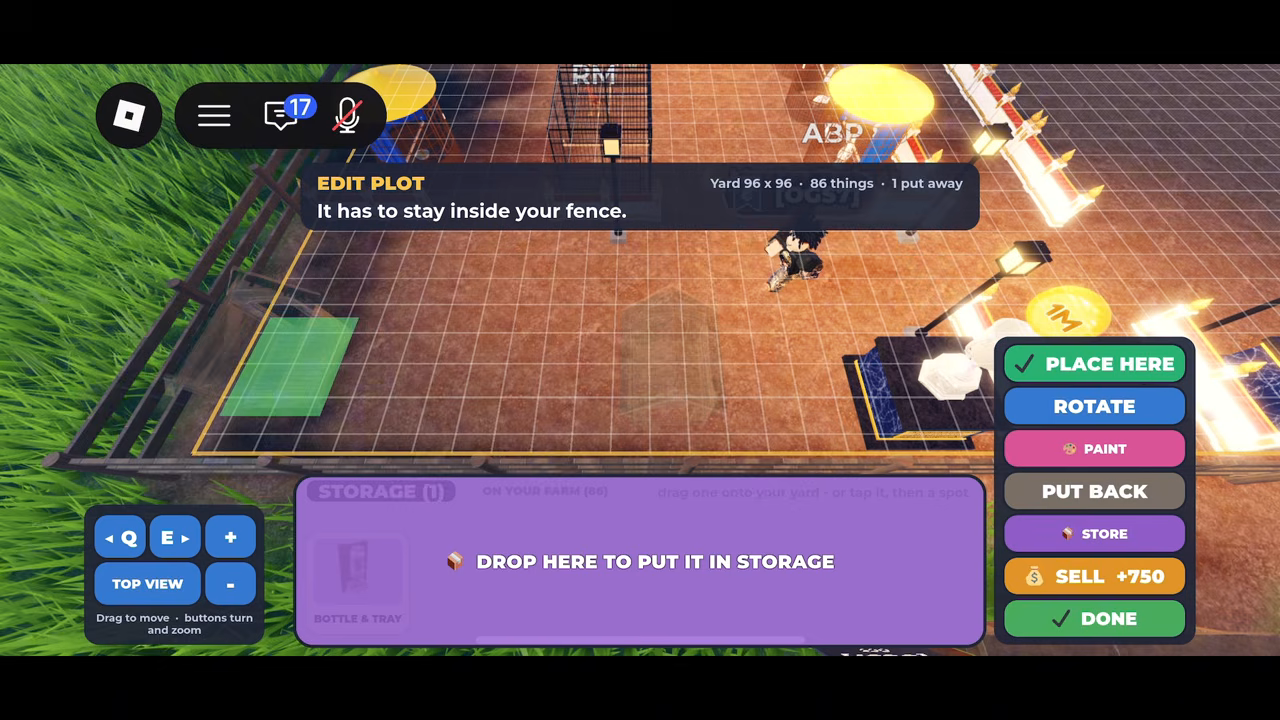
- Wooden Doghouse: with it already selected from STORAGE in EDIT PLOT, you can choose its position and orientation. It must stay inside your fence.
What can you improve on your farm?
The available improvements cover both growing your farm and decorating it:
| Improvement | What it means for your farm |
|---|---|
| More land | A coin purchase that helps your farm accommodate a bigger flock. |
| Coops | Another coin-funded improvement for supporting a bigger flock. |
| Training cages | Also among the improvements coins can buy as you grow your farm. |
| Decor | An available category for decorating your farm. |
Land, coops and training cages are therefore relevant when your goal is to grow the flock. Decor gives you another way to develop the farm’s appearance. For more detail on the individual building topics, see the land expansion guide and coops guide.
Put dog supplies out from EDIT PLOT storage
Vang’s Shop has a DOGS tab for dog-related farm items. Its instruction groups doghouses, bowls and dog food bins together: these items go into your EDIT PLOT storage, and you set them out on the farm from there.
That storage step matters when you are looking for an item to place. The shop instruction points you to EDIT PLOT rather than treating the shop itself as the placement interface.
Doghouses also have a specific purpose in preparing for dogs: every dog needs its own doghouse. The adoption interface points players to Vang > DOGS for that requirement. If you are planning for multiple dogs, account for a separate doghouse for each one. The guard dogs guide covers the related topic.
Position a Wooden Doghouse
Once a Wooden Doghouse is selected from STORAGE in EDIT PLOT:
- Choose its position. Tap a free spot on the farm or drag the doghouse to the spot you want.
- Adjust its orientation if needed. The interface provides a ROTATE control alongside the placement controls.
- Keep it within the fence. EDIT PLOT displays the restriction that the doghouse has to stay inside your fence.
- Use PLACE HERE to place it. CANCEL and DONE are also available in the editing interface.
This gives you control over the Wooden Doghouse’s position and orientation within the fenced plot. The same shop instruction sends bowls and dog food bins to EDIT PLOT storage, while the placement instructions above specifically describe the selected Wooden Doghouse.
Related Guides
Land Expansion Currency
Learn which currency buys additional farm land and how land joins coops and cages in supporting a bigger flock.
Coops: Purpose and Currency
Understand what coops contribute to farm expansion and which currency pays for them alongside other facilities.
Guard Dogs and Doghouse Setup
Follow the Wooden Doghouse setup and distinguish the Great Pyrenees role description from Moon’s individual adoption offer.